News & Blog
General Networking Trouleshooting
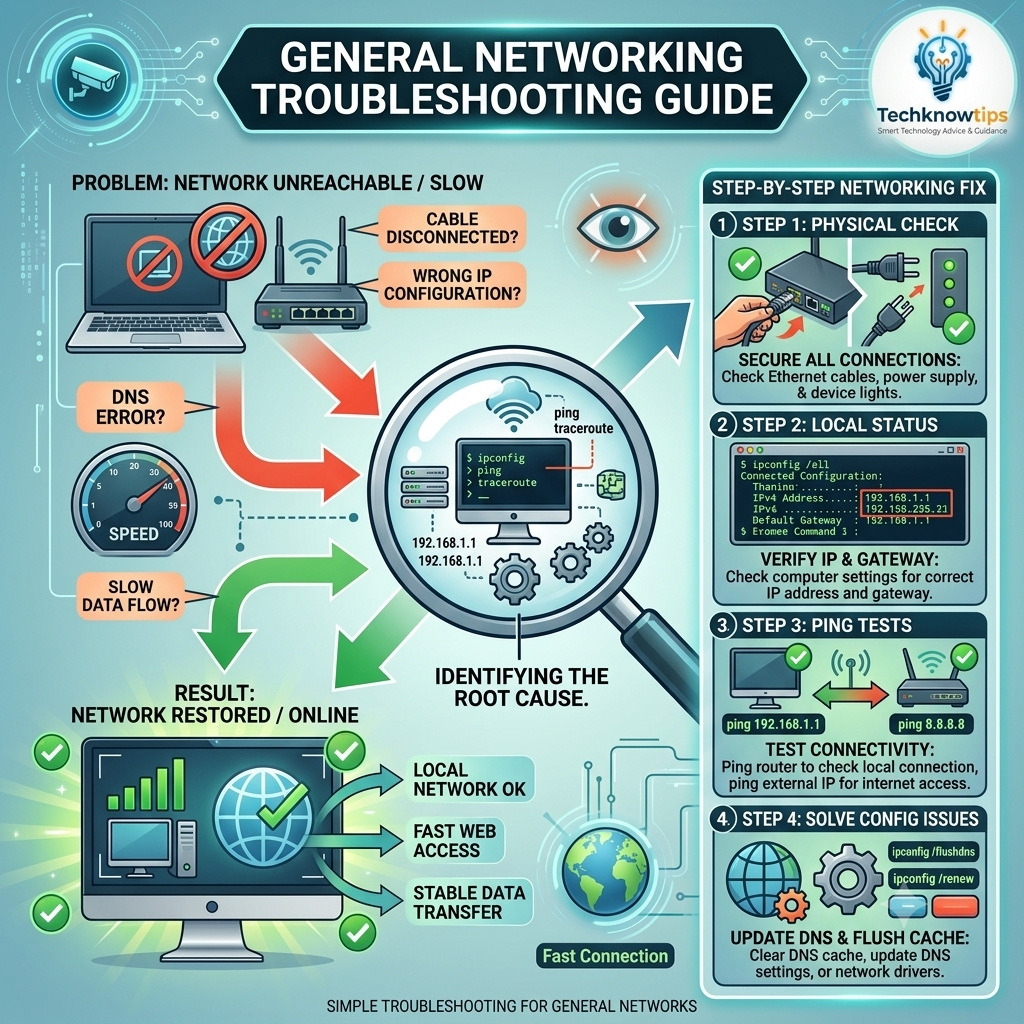
Identified Network Problems
Physical Disconnections: Unplugged or loose Ethernet cables and power sources.
Configuration Errors: Mismatched IP addresses or incorrect gateway settings.
Domain & Flow Issues: DNS lookup failures and bandwidth bottlenecks slowing down data flow.
4-Step Troubleshooting Process
Physical Check: Inspect physical connections, ensuring Ethernet cables are firmly seated, power adapters are plugged in, and hardware indicator lights show active activity.
Local Status Verification: Open the command line (
ipconfig /all) to check whether the device has been assigned a valid IP address and default gateway.Ping Tests: Perform connection tests using
ping 192.168.1.1to confirm communication with the local router, followed byping 8.8.8.8to verify outbound internet access.Configuration & Cache Cleanup: Resolve software-level bottlenecks by clearing the DNS cache (
ipconfig /flushdns), renewing the network lease (ipconfig /renew), or updating network drivers.
Restored Network Outcomes Following this systematic process restores local network communication, re-establishes fast web access, and ensures stable, uninterrupted data transmission.